


You’ve created a lot of valuable content, and you plan to keep adding more. Guides, templates, workshops, videos, lessons, downloads — you want all of it to live in one place where your audience can easily find what they need, learn at their own pace, and see you as the go-to expert in your space.
Just as importantly, you want that content library to look good and feel intentional, not like a dumping ground for links and files.
The problem is that most “resource library” setups feel overwhelming. They’re either hard to navigate, visually cluttered, or built with a patchwork of tools that don’t talk to each other. You might have the best content in the world, but if it’s difficult to access or confusing to browse, people won’t use it. And if you want to charge for access, the bar is even higher.
Your library needs to feel polished, organized, and packed with value for it to be an obvious yes for your customers.
The good news is that building a resource library doesn’t have to be a technical nightmare.
Podia is already designed to help you organize content, deliver value, and sell digital products in a way that feels simple for you and intuitive for your audience. With the right structure, you can turn your growing collection of content into a beautiful, easy-to-use library that supports your business goals.
In this guide, we’ll walk through:
- What an effective resource library needs
- Key things to think about as you plan your resource library
- Three different ways to build a resource library in Podia
By the end, you’ll have three practical setup options so you can choose the approach that best fits your content, your audience, and how you want to monetize it.
(If you’re looking for a place to build your library, start your 14-day free trial of Podia today.)
Considerations before creating a resource library for your audience
A resource library works best when you have a growing collection of content that helps people achieve one clear goal. Think courses, workshops, templates, guides, recordings, or other resources that an audience member would want to use together over time.
Instead of selling everything separately, a library lets you bundle that value into one organized experience, giving your customers a clear path to learn and explore while creating more predictable revenue for your business.
That said, a successful resource library doesn’t happen by accident. At a minimum, your library needs to be clearly organized and easy to navigate. People should be able to quickly understand what’s available and find the resources that are most relevant to them, without feeling lost or overloaded.
Here are a few key decisions to make before you jump in:
- Who is this library for? Your resource library should be built for one clear audience, so every member genuinely benefits from and is interested in everything inside.
- Will it be free or paid? A smaller, free library can work well as a lead magnet, while a paid library works better for meatier content and a premium learning experience.
- How will you charge for access? If you’re going the paid route, decide whether the library will be available for a one-time fee or a recurring subscription.
- Will you offer multiple tiers? If you’re using a subscription model, think about whether all resources live in one place or if different tiers unlock different levels of content. (For example, an intro level with the basics and a VIP level with more perks.)
- Do you want interaction between members? Some libraries work best as quiet, self-paced spaces, while others benefit from discussions, shared questions, or community elements.
- How often will you add new content? Consider whether this will be a dynamic library with regular updates or a more static collection that’s updated occasionally with larger resources. It’s good to share this information with buyers upfront to set expectations.
Once you have clarity on these questions, choosing the right structure becomes much easier. From there, you can focus on building a resource library that feels intentional, valuable, and genuinely useful for the people you’re creating it for.
How to build a resource library in Podia three ways
Podia has your online courses, digital downloads, community, coaching, and events all in one spot. You can also build a website and run your email marketing, so you don’t need to connect a ton of tech to launch your library.
Here are three different ways you can use Podia’s features to make your resource library exactly the way you like.
Option 1: Create a community membership resource library
Best for dynamic libraries with multiple tiers where members can interact, ask questions, and learn together over time.
Pros
- Resource library and community in the same place
- Members can collaborate and learn from each other
- Charge a subscription price and create recurring revenue
- Create multiple plans, with different resources unlocked at each level
- Mix free and paid areas in the same space
- Notify members when new resources are added, bringing people back into the library
Cons
- If you include interactive community spaces with your library, you’ll need to make a plan for sharing regular content and keeping people engaged. You might also need some community guidelines to make sure people use the space the way you intend.
One of the most popular ways creators build resource libraries in Podia is by using the community feature. A Podia community is a single space where your audience can come together, chat with you and each other, browse through products they have access to, and shop for more products in your online store.
Each person can only see the content and community spaces that they have access to. You might have a free tier, one or more paid tiers, or a mix of both, and each tier can unlock different areas of the community.

Your community plans can also include access to courses, products, and private spaces. This means that you can include as many courses, downloads, events, and coaching offers as you like on any plan, and they’ll automatically show up in the “Products” tab for people who join that particular plan.
Your members will be able to organize the products they have access to based on type, name, last accessed, or category. This makes it easy for members to stay organized and find that they’re looking for.

In addition to the products area of your community, you also have spaces. Spaces are where you’ll publish posts, and each post can include written lessons, videos, audio recordings, downloads, embedded content, or links to external resources.
You can organize posts by topic, allow comments, and optionally let members create their own posts if you want peer-to-peer discussion.
Running your library inside a community also makes it easy to monetize. You can charge a recurring subscription, offer a free trial so people can preview the library, and let members upgrade or downgrade plans as their needs change. For creators who plan to add content regularly, this setup works especially well.
Here are a few real-world examples of creators using a community-based resource library:
Sales coach Matt Easton from Easton University offers an “all access” membership that come with dozens of courses, twice weekly coaching calls, and a private community area for members. Members pay a flat monthly rate for access to all resources inside the library.

Bill Henry from Mr. Henry’s Music World uses his community as a resource library for elementary music teachers. Educators can sign up for access to all his classroom resources with new ones added regularly, and they have the option to pay monthly, annually, or for lifetime access.

Joseph from Flex Lessons uses a community to teach classical piano. The membership includes two tiers, beginner and intermediate, with each plan unlocking the appropriate courses and lesson library. Students can submit video recordings for feedback and book 1:1 lessons for extra support.

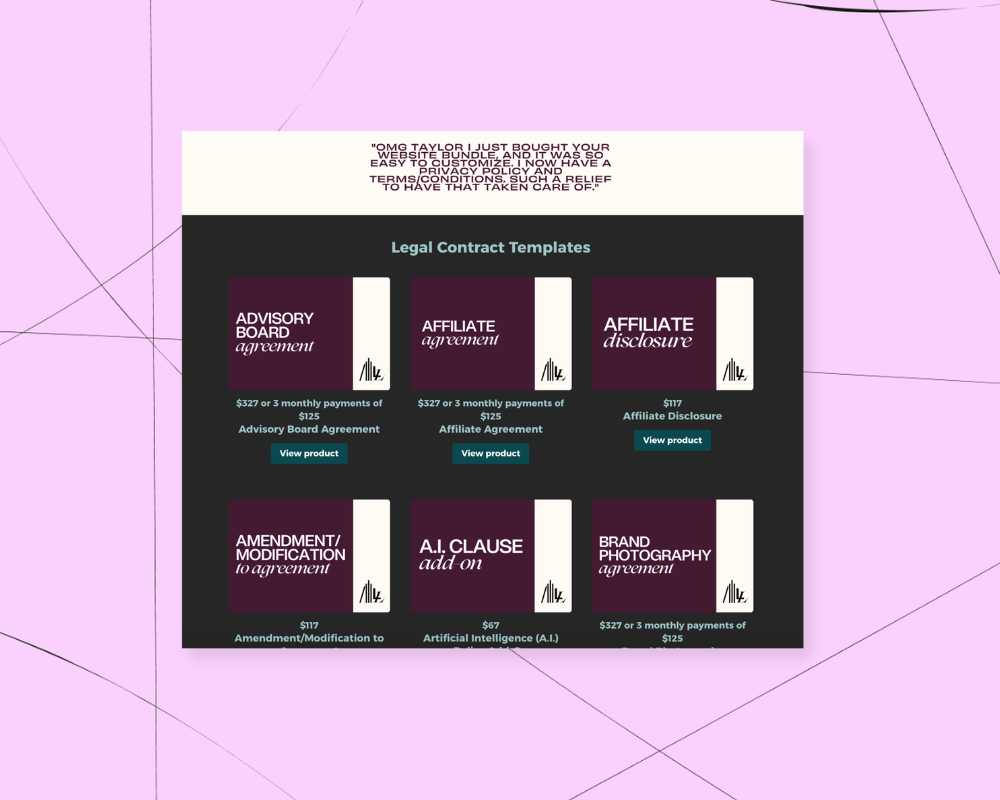
Taylor from Legalmiga Library offers a paid resource library of legal templates for small business owners. Customers can purchase templates individually or buy a “library card” that unlocks more than 50 templates, courses, quarterly live Q&As, and additional bonuses for one annual price.

This approach is a strong choice if you want your resource library to feel alive, interactive, and continuously evolving, while also supporting subscriptions and long-term engagement.
Option 2: Set up a course with your library resources organized into lessons
Best for more static libraries that follow a clear, linear structure
Pros
- You can charge a one-time fee for access, with the option to add payment plans or a subscription
- You control the order of resources, which is ideal if students should move through the content in a specific sequence
- Lessons can be checked off as completed, helping learners track their progress
- Content is clearly laid out in a sidebar, making it easy to see everything that’s included
- You can lock lessons so that students need to complete all previous lessons and quizzes before moving forward, allowing you to enforce the order people move through your resources.
Cons
- Large libraries can become long and harder to manage within a single course
- You can only offer one access level per course, so everyone who purchases gets access to everything
Another common way creators build a resource library in Podia is by using a course to house all of their content. With this approach, you create modules for your main topics and add each resource as a lesson within those modules. Lessons can include videos, downloads, text, audio, links, and embedded content, just like any other Podia course.
That said, each library resource would need to fit nicely into a lesson. For example, a lesson could have a video and a worksheet for that “Library item”, but you couldn’t have courses within courses.
This setup works especially well if your resources are meant to be consumed in a certain order. For example, if you want people to start with foundational material before moving on to more advanced topics, a course-based library gives you that structure by default.
Everything is displayed in a left-hand sidebar, so students can easily click through lessons and see how the content fits together.

Courses also give you flexible pricing options. You can charge a one-time fee, offer a payment plan, or set up a paid subscription. That said, this option works best when you only need a single access level. If you’re planning multiple tiers with different resources, a community or bundle-based approach will be a better fit.
This structure is ideal for libraries that are mostly static, with occasional updates rather than frequent additions. Adding a new lesson every month works well here, while daily or weekly updates may start to feel unwieldy over time.
You can also decide how interactive the experience should be. Podia lets you turn comments on or off at the lesson level, so you can keep the library self-paced and individual, or invite collaboration and conversation if that’s valuable for your audience.
If you choose this option, your resource library will feel more like a guided learning experience than an open-ended hub.
Option 3: Add each resource as an individual product, then sell them one by one or as bundles
Best for piecemeal libraries where each resource stands on its own
Pros
- Customers can pick exactly what they need and pay only for those resources
- You can bundle products together and offer a discount so customers can buy multiple resources at once
- Works well when individual resources can drive sales on their own
Cons
- A large catalog of products can feel overwhelming if it isn’t well-organized
- Customers may miss new releases or updates if they’re not checking your site regularly
- Not ideal for frequent updates, since bundles may need to be adjusted each time you add something new
With this approach, each resource you create lives as its own Podia product. That might be a digital download, course, ebook, workshop replay, or webinar. Visitors to your site can purchase one resource at a time, building their own personalized “library” based on what’s most relevant to them.
Instead of a single gated space, the library experience feels more like a storefront. People browse, choose what they need, and come back later for additional products. This works especially well when your resources are useful in isolation and don’t need to be consumed in a particular order.

You can also group related products together into bundles. Bundles let customers save money by purchasing multiple resources at once, while still keeping each item available individually. This is a good option if your products cover related topics but don’t all belong in one linear program or shared membership space.
From the customer’s perspective, everything they buy appears as a separate product in their Podia account. That makes it easy to return to specific resources without digging through a larger library. This setup can also be helpful if you serve multiple audiences, since you can create different bundles for different needs without forcing everything into one experience.
Here are a few examples of creators using this approach:
Ashley Danyew offers a wide range of music education resources for choir directors, church musicians, and educators. Her products include full courses, quick-win seminars, planning kits, sheet music, and flash cards. Each resource can be purchased individually, making it easy for educators to grab exactly what they need and get back to teaching.

This option is a strong fit if your content works well as individual resources, you want flexible pricing, and you’re comfortable managing a growing product catalog rather than a single shared library space.
Creating a great resource library experience for your customers
Once you’ve decided how your resource library will be structured, the next step is making sure people can find it, understand its value, and enjoy using it over time. A strong library isn’t just about the content inside. It’s also about how you present it, how you onboard new members, and how you continue supporting them after they sign up.
Create a clear, compelling sales page
Your sales page is often the first impression people have of your resource library, so it should make it immediately clear what the library is, who it’s for, and why it’s worth joining. At a minimum, list exactly what customers get when they sign up, along with short descriptions of the resources included. This helps people quickly understand whether it’s a good fit for them.
You can strengthen the page by going a step further. Add FAQs to address common questions, include testimonials or examples if you have them, and focus on the outcomes people can expect from using the library. Explain how the resources will help them solve problems, save time, or make progress toward their goals.
Podia’s website builder makes this easy to set up. You can use the product page that Podia automatically generates or create a custom sales page from scratch. From there, add and customize sections using the page editor, choosing the layout and content blocks that best tell your story.

Once your page is live, make sure it’s easy to find. Link to your resource library from relevant blog posts, your email newsletter, your social media profiles, and anywhere else your audience is already spending time. The clearer the path to your library, the easier it is for people to discover everything you’ve created in one place.
Set up an email welcome sequence
No matter which library structure you choose, it’s important to help new customers feel confident and oriented as soon as they join. A welcome sequence introduces people to your business, shows them how to use the library, and helps them get value right away. In Podia, you can do this using email campaigns.
The most important goal of your welcome sequence is to answer the question, “What should I do first?” When people buy access to a resource library, they’re often excited but unsure where to start. Clear guidance early on makes a big difference in how satisfied they feel with their purchase.
In Podia’s campaigns feature, you can set the entrance condition to “gains access to product” and select your library product. From there, create a short sequence that sends automatically when someone joins. Three emails over the first few days is a solid starting point, and you can always adjust based on your audience.

A simple structure might look like this:
- Day 1: Welcome them to the library and explain how to navigate the space. If you’re using a community, show them how to set up their member profile with a photo and short bio, since this appears when they comment or post. Give them one clear next step, such as introducing themselves, watching a welcome video, or starting with a specific resource.
- Day 2: Share more about you and your business. Explain who the library is designed to help, what problems it solves, and how you recommend using the resources for the best results.
- Day 3: Highlight especially helpful or popular resources so people don’t feel overwhelmed. Link to key lessons, active discussion areas, or a recommended starting point if the library follows a linear format.
You can also add a follow-up email about a week later to see if they need help, answer common questions, or invite them to reply directly if they’re feeling stuck.
Setting up this sequence creates a clear point of contact between you and your customers. It helps people get value faster, improves retention, and reduces support requests, since everyone receives the same helpful guidance automatically when they join.
Regularly add fresh content to support retention and recurring revenue
If you’re charging a recurring subscription, people need a clear reason to stay month after month. The most successful subscription-based resource libraries have a plan for ongoing value, whether that’s new content, live experiences, or both. This helps members feel confident that their subscription is worth keeping, not just something they signed up for once and forgot about.
Fresh content doesn’t always mean creating something huge every time. You might add a new lesson, template, or resource on a regular schedule, or rotate in live elements like Q&A sessions, office hours, coworking time, ask-me-anything discussions, or a book club.
These live components can be especially powerful because they give members a reason to show up at a specific time and feel connected to you and the rest of the group.
New additions also create natural marketing moments. Each time you release something new, you have a genuine reason to talk about your library again. You can send an email to your broader newsletter audience, using Podia’s audience filters to reach people who aren’t members yet, and let them know what was just added.

Framing these updates around what’s new and what people can learn keeps the message helpful rather than salesy.
Over time, this rhythm of adding value, communicating updates, and inviting new people in helps your resource library feel active and relevant. It supports retention for existing members while consistently bringing new customers into your business.
Your full library, already connected to the rest of your online business
A resource library is one of the most effective ways to share a large body of knowledge without overwhelming your audience. It lets you package your expertise into a format that’s easy to explore, genuinely valuable to use, and aligned with how your customers actually want to learn.
Whether you choose a community-based library, a structured course, or a collection of individual products and bundles, the right setup can help you deliver more value while building reliable, long-term revenue.
The key is choosing a structure that fits your content and your goals, then supporting it with a clear sales page, a thoughtful onboarding experience, and a plan for ongoing engagement.
When those pieces work together, your library becomes more than a collection of files. It becomes a central part of your business that attracts new customers, keeps existing ones engaged, and reinforces your position as an expert in your space.
With Podia, your resource library, products, community, sales pages, website, blog, and email marketing are all connected in one place. Podia automatically tracks what each customer has access to, so you can communicate with them more thoughtfully and tailor your marketing without juggling multiple tools or systems.
If you’re ready to turn your content into a library that’s organized, easy to manage, and built to grow with your business, Podia gives you everything you need to create it and market it, all from one platform. Start your 14-day free trial today.


