

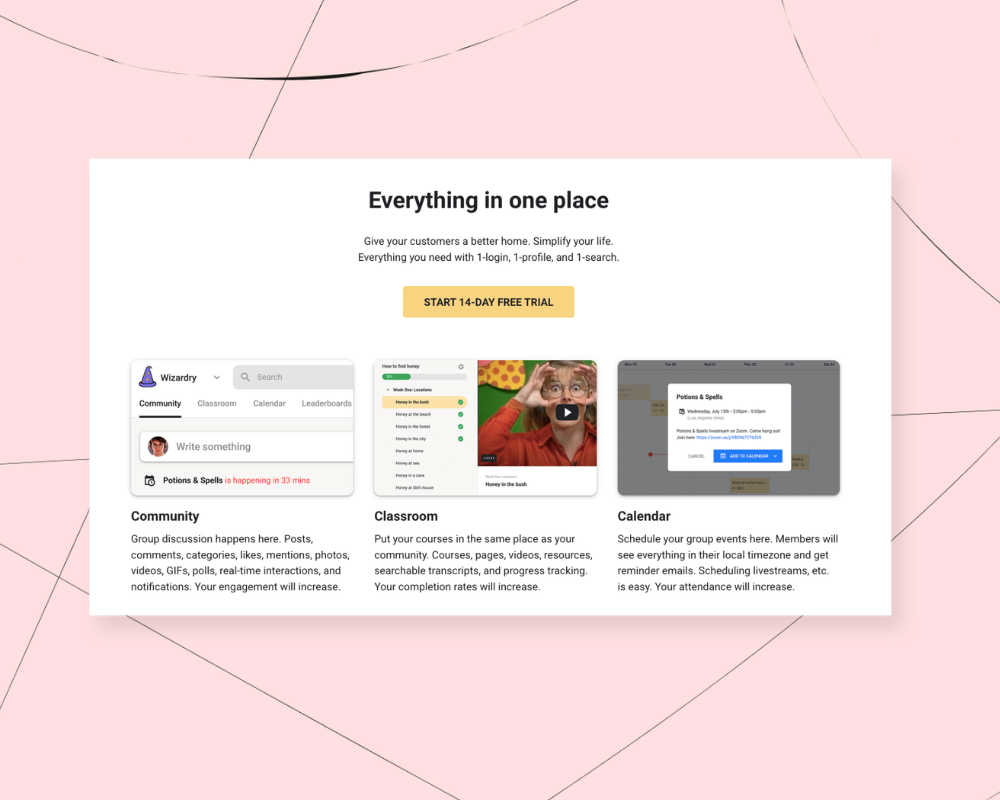

Having a community can be a great way to connect with your audience, share your knowledge, and earn recurring revenue. To bring your community to life, you’ll probably need a community platform, and there are a lot to choose from!
Paid communities have quietly become one of the most reliable creator business models: according to Zuora’s 2025 Subscription Economy Index, subscription businesses grew their unique subscriber counts by 25% over the past two years and saw revenue grow 11% faster than the S&P 500.
You may have come across Skool as a popular option for building a paid community, and it’s known for having a simple setup with lots of gamification features. But every platform has pros and cons, and no one tool will be the best fit for every business.
In this guide, we’ll talk about:
- What Skool does well and where it falls short
- 8 alternatives to Skool for different types of businesses
- How to choose the right platform based on your goals
It’s important to pick a community platform that supports your whole business so you can grow without running into limits. It’s not fun to migrate and rebuild down the line, so let’s make sure you’ve got all the information you need to make the best decision for your work.
And don’t worry if your community starts small. The same Zuora research found that 84% of consumers say they’re getting the same or even greater value from their subscriptions than a year ago — what matters is choosing a platform that helps you make those memberships worth paying for.
We’ll start by looking at where Skool shines and where it may be tricky for some businesses.
(Short on time? Podia is a great alternative to Skool that comes with your full community, courses, events, coaching, and downloads. You can build a full website and run your email marketing too. Try Podia free for 14 days.)
Skool Pros and Cons

Skool is primarily a community platform. You can create free or paid communities with multiple tiers, and you can add courses or gated content that members unlock by reaching participation milestones or by paying for premium access.
Skool also has a marketplace which can help new members find you. But outside of the marketplace feature, most Skool creators need to bring their audience themselves, since Skool doesn’t have built in growth tools.
Skool has two pricing plans, and there's a 14-day free trial:
- Hobby: $9/month ($7.50/month billed annually) with a 10% transaction fee. Includes unlimited members, courses, videos, and live calls.
- Pro: $99/month ($82/month billed annually) with a 2.9% transaction fee. Includes everything in Hobby with affiliates, a custom URL, and a lower transaction fee
Skool pros (community, gamification, affiliates)
When you log into your Skool community, you'll see a simple setup with a home feed, a live events calendar, and a classroom area where you can add courses. You can organize posts by category to make it easier for members to find what they're looking for, and there's a search bar where people can look up posts, comments, content, and other members.
A big perk of Skool is that your community comes with tools to encourage participation. For instance, there are gamification features like points and leaderboards to motivate members to post and participate. You can also allow members to "unlock" courses and content when they reach certain levels, which can motivate people to be more active in your space.
You can set up as many plan tiers as you like for your Skool community, and you can charge one-time or recurring payments (with monthly or annual billing).
You can also let members promote your community and earn a commission. Affiliate marketing is built in with preset commissions of 10%, 20%, 30%, 40%, or 50%.
Skool cons (no website or landing pages, limited email, basic courses)
That said, Skool focuses almost entirely on the community experience, which means you'll probably need extra tools as your business grows.
Skool does not include a website builder, blog, or landing pages. You can add a simple "About" tab for your community, but that's all the space you'll have to convince people to join.
Email functionality is limited to broadcast-style messages for existing members. Skool doesn't have lead magnets, segmentation, automations, or email list sign-up forms, so you'll need a separate email service if you plan to promote your community that way.
While it's nice to have courses built in, the options are relatively simple. You can create evergreen or drip content, but there are no built-in quizzes or completion certificates, and products can't be sold independently from the community. If you want digital products to stand on their own outside of your community membership, Skool's structure may feel limiting.
Finally, Skool charges transaction fees on all plans, including the Pro plan. As your revenue increases, the total fees you pay to the platform increase as well. Ideally, it's best to pick an option where you can remove transaction fees as your income grows, so you aren't stuck paying more every month.
8 best alternatives to Skool
Skool is a solid option if you only need community features and don’t plan to offer stand-alone digital products, but if you’re looking for more features and flexibility, these alternatives might be a better fit.
#1 Podia

Podia is an all-in-one platform built to run your entire online business. You can create your community, website, blog, landing pages, digital products, courses, coaching offers, webinars, and affiliate program all in one place.
You can run a free or paid community with as many tiers as you like, and you’re not limited to only selling memberships. Podia has standalone online courses, digital downloads, webinars, product bundles, and coaching offers, or you can combine products and community access to create different plans.
This flexibility makes it easier to structure your business the way you want, and it gives you the freedom to experiment with different products as you grow.

For example, The Marketing Club has a community membership with live workshops, coworking, and courses. Clients can also book 1:1 private marketing sessions or buy “done for you” content packages that are customized for their business. This gives The Marketing Club several ways to bring in sales in addition to subscriptions.

Podia also includes tools to market your business. You get email newsletters, broadcasts, templates, segmentation, and automations, along with campaigns that trigger when someone takes an action in your business. You can create lead magnets to grow your audience and email funnels that guide people toward paid products or community memberships.
While both Podia and Skool offer community features, Podia includes more tools for building and marketing your business around that community. Instead of connecting separate platforms, everything works together out of the box.
Podia pros:
Podia is a great fit if you want to manage your whole business in one spot. You get a website, landing pages, and a blog, so you don’t need a separate platform to establish your brand. Email marketing and automations are built in, making it easy to stay connected with members and customers.

You can sell community access on its own, sell products independently, or bundle everything together. Members can move between tiers, and you can create private spaces within your community for different groups of people.
On the pricing side, Podia’s Shaker plan is less expensive than Skool’s Pro plan, and there are no transaction fees, which allows you to grow revenue without increasing your monthly expenses.
Podia cons:
Podia is designed primarily for digital businesses. It isn’t optimized for selling physical products, so it’s a better fit for creators offering digital products, memberships, coaching, courses, or community-based programs.
Podia pricing:
Podia has three plans: Mover, Shaker, and Earthquaker. All plans include your products and community, as well as unlimited sales and unlimited community members.
- Mover: $49/month and 5% transaction fee ($42/month when paid annually): Includes your community, website builder, blog, landing pages, digital products, courses, custom domains, customer messaging, and third-party code, with up to 50 products and 25 community spaces
- Shaker: $99/month and 0% transaction fee ($84/month when paid annually): Includes everything in Mover, plus affiliate marketing, with up to 150 products and 100 community spaces.
- Earthquaker: $179/month ($150/month when paid annually) with unlimited products, spaces, and video
All Podia plans include email marketing features — up to 100 subscribers on Mover, 500 on Shaker, and 1,000 on Earthquaker — like automations, newsletters, email templates, segmentation, tagging, and campaigns. If you like, you can upgrade your Podia Email plan at any time to add more subscribers as your list grows.
Podia also includes a free migration service on paid plans. The team will move your products and customers over from another platform so you can get set up faster without extra work. Learn more about how migrations work here.
#2 Mighty Networks

Mighty Networks is a community platform that allows you to host your community and courses in the same space. Communities can be free or paid, and you can create multiple spaces for members to interact. Mighty Networks also has live streaming, virtual events, and you can build a resource library inside your community.
Mighty Networks also has an option to build a fully branded mobile app. Pricing for custom apps isn't listed publicly, but it's available for higher-tier customers if that's something your business needs.
Mighty Networks pros
Mighty Networks includes a wide range of community features. Members see an activity feed, and you can create private groups, topic-based spaces, polls, and both live and pre-recorded events. All plans include streaming, with the number of streaming hours increasing on higher tiers.
You can also build drip and cohort courses directly inside your community. All plans have space for unlimited members, which is a nice perk as your business grows.
Mighty Networks works well if you primarily need community features with courses added in, and it's a good option if you anticipate needing a custom-branded mobile app in the future.
Mighty Networks cons
The downside is that Mighty Networks charges transaction fees on all plans. While the fees aren't huge (2% to 0.5% depending on the plan), they can still add up as your revenue grows.
Landing page functionality is also limited. The Launch and Scale plans each include only one landing page and Growth has only three landing pages. If you plan to run multiple offers or campaigns, this may feel restrictive.
There are no traditional email marketing features with Mighty Networks, so you'll likely need a separate tool to build and manage your email list. Mighty Networks does not include a full website or blogging feature, which means you might need to use an additional website tool alongside it.
Mighty Networks pricing
Mighty Networks has two main plans and a 14-day free trial. They also offer Mighty Pro, an enterprise-level plan with a custom-branded app, but you'll need to reach out to them directly to learn more about what's included and how much it costs.
- Launch: $95/month ($79/month billed annually) with a 2% transaction fee. Includes unlimited members, community, courses, basic automations, 20 community spaces, and 200GB storage
- Scale: $215/month ($179/month billed annually) with a 1% transaction fee. Includes everything in Launch, plus more automations, multi-feature spaces, API and integrations, migration services, and 500GB storage
- Growth: $425/month ($354/month when paid annually) with a 0.5% transaction fee: Includes everything in Scale, plus 3 landing pages, advanced automations, simultaneous promotions, growth expert sessions, priority support, and 1TB storage
- Mighty Pro: custom pricing with a 0.5% transaction fee. Includes everything in Scale, plus custom-branded iOS and Android apps, a dedicated strategy team, advanced data reports, unlimited everything, and 4TB storage
#3 Circle

Circle is a community platform that allows you to build your community, website, and courses in one place. The platform puts strong emphasis on AI tools, so if you're interested in building your business with the help of AI, this could be an interesting option for you.
In terms of community features, Circle has live streams, live events, live rooms, and messaging inside your space. You can also create courses and gate content behind paywalls, including add-ons like coaching or access to premium community areas. Courses live inside your community rather than as standalone products.
Circle pros
With Circle, you can run your community, build a website, create courses, and manage email from a single platform. Circle has gamification elements, live streaming, events, and direct messaging to encourage engagement among your members.
Courses can be layered into your community, and people can upgrade their plan tier to get access to more content or perks.
Circle also offers more advanced options on higher-tier plans, including AI agents and enterprise-level white-label mobile apps. For larger organizations or brands that want a custom app, these enterprise features may be appealing.
Circle cons
Like Skool, Circle charges transaction fees on all plans. As your revenue grows, those fees also grow with it, which can increase your long-term costs.
While it's nice to have features like workflows and automations, Circle only offers these on higher-tier plans. If your business relies on advanced automation, you may need to upgrade to keep things running behind the scenes, or go with a Circle alternative.
Circle pricing
Circle has two main pricing plans and a 14-day free trial. They also offer an enterprise-level solution called Circle Plus, with custom pricing based on what your business needs. Circle's listed prices are for annual billing, and the month-to-month rate isn't published (it's typically somewhat higher).
- Professional: $89/month with a 2% transaction fee (annual billing). Includes 20 community spaces, 100GB storage, 100 live stream attendees, and 10 hours of live stream functionality
- Business: $199/month with a 1% transaction fee (annual billing). Includes everything in Professional, plus automated workflows, 30 community spaces, 250GB storage, 200 live stream attendees, and 15 hours of live stream functionality
Circle also offers email through its Email Hub add-on. It's free for your first 100 contacts, and prices start at +$19/month for up to 1,000 contacts.
#4 Kajabi

Kajabi is an all-in-one platform for building and running an online business. You can sell courses, digital downloads, coaching, and memberships, and Kajabi also has a community feature.
In addition to products, Kajabi also includes a website builder, email marketing, and affiliate management so you can run most parts of your business in one place.
On the Pro plan, Kajabi includes a branded mobile app along with API access and a custom code editor. For businesses that need more customization and premium features, this higher tier could be a good option.
Kajabi pros
Kajabi is an all-in-one option with your products, marketing, and community. Your community can be free or paid, and you can organize it into channels based on topics. Channels can function as feed-style discussions or group chats, depending on how you want members to interact.
Like Skool, Kajabi includes gamification features such as points and badges to encourage participation.
Kajabi cons
Kajabi has contact limits on all plans and product limits on the Basic and Growth plans. Both free and paid products count toward your total product limit, which can become restrictive if you hope to make lots of different products for your customers.
Kajabi's starting price is also much higher than other community tools. While you do receive more built-in features, the cost can be challenging for creators who are just starting out or testing a new idea.
(If Kajabi’s price is too high for your budget, you can see more options in this article about Kajabi alternatives.)
Kajabi pricing
Kajabi has three pricing plans and a 14-day free trial. One thing to note is that you need to put in your credit card to start the trial, and you'll automatically be charged at the end of the trial period. If you test it out and decide it's not for you, you need to cancel to avoid the charge.
- Basic: $179/month ($143/month billed annually). Includes 5 products, 2,500 contacts, 1 website, 1 community, 1 extra admin user, landing pages, funnels, and email marketing
- Growth: $249/month ($199/month billed annually). Includes everything in Basic, plus 50 products, 25,000 contacts, 10 extra admin users, affiliate marketing, cohort courses, advanced automations, webhooks, third-party integrations, and the ability to remove Kajabi branding
- Pro: $499/month ($399/month billed annually). Includes everything in Growth, plus unlimited products, 100,000 contacts, 3 websites, 3 communities, 25 extra admin users, a branded mobile app, API access, and a custom code editor
#5 Teachable

Teachable is primarily known as an online course platform, and it has expanded its feature set to include coaching, digital downloads, memberships, and basic website functionality. You can sell multiple product types from one account, and Teachable has recently added AI tools designed to help creators build courses and other products more quickly.
Note that as of 2026, Teachable has said community is no longer a supported feature. You can still do content memberships, but it’s probably not the best fit if you want an interactive community spaces for your business.
Teachable pros
Again, Teachable is a strong option for creators who want to build and sell online courses. Courses can be as in-depth as you like, and you can require students to complete lessons in order, watch videos fully, or pass quizzes before progressing.
In addition to courses, you can also create and sell downloads, coaching, and memberships, and your students can access their content online or with Teachable's mobile app.
Teachable also includes built-in AI tools to assist with course and product creation, which can help speed up setup.
Teachable cons
Teachable has product limits on all plans, which may be an issue as your business grows. Email marketing features are only available on the Builder plan and above, and even then, they're relatively basic, letting you message people who've already purchased or enrolled, with a basic newsletter sign-up form. You'll need a third-party tool for scheduling or automated campaigns.
As of 2026, Teachable has said community is no longer a supported feature. If community is part of your long-term plans, Teachable isn't a good place to build it, since there's no ongoing development or support behind it.
Overall, Teachable is a better fit if courses are your main product, and community isn't something you're counting on.
Teachable pricing
Teachable has three pricing plans. They also offer a custom Enterprise plan for larger organizations, available by contacting their sales team.
- Starter: $39/month ($29/month billed annually) with a 7.5% transaction fee. Includes 5 published products, course certificates, upsells, and cart recovery
- Builder: $89/month ($69/month billed annually) with a 0% transaction fee. Includes everything in Starter, plus 10 published products, affiliates, and real-time support
- Growth: $189/month ($139/month billed annually) with a 0% transaction fee. Includes everything in Builder, plus 50 published products, 5 admin users, the ability to import students, and the option to remove Teachable branding
#6 Patreon

Patreon is a well-known platform for creators who want ongoing support from their audience. It's commonly used by musicians, artists, podcasters, YouTubers, and other content creators who already have a following and want to monetize that audience.
On Patreon, supporters typically pay a monthly subscription in exchange for perks like exclusive content, bonus episodes, behind-the-scenes updates, or early access. You don't have to offer rewards, though, some creators also use it as a way for fans to support their work financially so they can keep things running in their business.
Patreon also has a community feature where you can share posts and exclusive content, chat with your members, and send updates. You can sell digital files through Patreon's storefront feature too.
Patreon pros
Patreon is free to get started, and it also has strong brand recognition, so many audiences are already familiar with how it works. This can make it easier to explain your offer and encourage supporters to join.
Patreon is especially interesting for creators who want to give people a way to support their existing content on an ongoing basis. While you can offer tiered perks, it's also possible to receive support without building complex products or courses.
Patreon cons
Patreon does not include a standalone website or customizable landing pages beyond your creator profile on the platform. There's no way to turn off Patreon branding or meaningfully customize the layout, so if you want more control over your brand, blog, or sales pages, you'll need a separate website tool.
Patreon also doesn’t have built-in email marketing, which can make it hard to build your audience outside the platform.
Finally, Patreon charges a 10% transaction fee on all sales made through the platform, and that fee remains in place no matter how much you earn. If a customer subscribes through Patreon's iOS app, Apple's purchase system adds an additional 30% on top of Patreon's 10% fee.
(You can learn more about why people pick Patreon alternatives in this guide.)
Patreon pricing
Patreon is free to use, with no flat monthly fee. Instead, you'll pay transaction fees on your earnings:
- 10% platform fee on all sales made through Patreon
- An additional 30% fee from Apple on sales made through the Patreon iOS app, on top of Patreon's 10% fee
#7 Heights Platform

Heights Platform is built for course creators who want to pair online courses with a community. In addition to courses and community spaces, it includes a website builder, blog, and landing pages.
A major part of Heights is its AI tools, which are designed to help you with course creation and content. You can create unlimited courses and community spaces on higher plans, run live streams and group calls, and build an affiliate program. Unlike Skool, courses can be sold as standalone products rather than being tied to a community.
Heights also includes built-in email functionality, allowing you to schedule and send messages to your students and customers.
Heights Platform pros
Within the community, Heights includes gamification features to encourage engagement. Members can earn points and badges, and can also create and share projects to showcase what they've learned. Heights combines products and courses with community, and does not charge transaction fees on any of its plans.
Heights Platform cons
Heights limits the number of active students and contacts you can have on most plans, and you only get unlimited active students on the top-tier Academy plan.
The entry-level Challenge plan is designed to help you build a single challenge-style course that runs on a fixed schedule with dripped emails, and it doesn't include community features or a full website.
Community features are not available until the $49/month Basic plan and website functionality is also tiered. The Basic plan limits you to 5 website pages, and you'll need to upgrade to the $119/month Pro plan for a full drag-and-drop website builder with unlimited pages.
Heights Platform pricing
Heights Platform has four paid plans and a 30-day free trial. Heights doesn't charge transaction fees on any plans.
- Challenge: $29/month ($19/month billed annually). Includes one challenge course, unlimited total students, up to 100 active students, and 1,000 email contacts
- Basic: $49/month ($39/month billed annually). Includes everything in Challenge, plus unlimited courses and challenges, unlimited community channels, digital products, 5 website pages, an affiliate program, up to 5,000 active students, and 5,000 email contacts
- Pro: $119/month ($99/month billed annually). Includes everything in Basic, plus a full drag-and-drop website builder, custom domain, live streaming, removal of Heights branding, up to 10,000 active students, and 10,000 email contacts
- Academy: $499/month ($399/month billed annually). Includes everything in Pro, plus unlimited active students, 100,000 email contacts, and more advanced features
#8 Heartbeat

Heartbeat is a community-focused platform with a strong emphasis on AI tools and live or virtual events. There’s an AI assistant that can build courses and automated workflows directly inside your community, and you can host events, create public or private spaces, and trigger automated workflows when members take certain actions.
You can also build evergreen or cohort-based courses inside your community and set up a referral program so members can invite others.
While Heartbeat includes some basic marketing features like landing pages and an affiliate program, it's built first and foremost as a community platform rather than a full business system.
Heartbeat pros
Heartbeat is a good fit if you want a community tool with AI features and event hosting at the center of the experience. There’s also an option to make your own branded web and mobile app on higher tiers.
Heartbeat cons
Heartbeat charges transaction fees on all plans, ranging from around 5% down to 1.25% as you move up in tier, which can add up as revenue grows. It does not include a full website builder or blogging platform, so most creators will need a separate tool for their main website. Landing pages are included, but they're limited by plan: just 1 custom landing page on Build, 15 on Grow, and 50 on Scale.
Member limits are also tiered. Build caps out at 350 members and Grow at 5,000, with unlimited members only available on the $849/month Scale plan.
Heartbeat pricing
Heartbeat has three pricing plans and a 14-day free trial.
- Build: $49/month ($40/month paid annually) with a 5% transaction fee: Includes up to 350 members, Pulse AI, unlimited channels, courses, events, documents, and landing pages, 5 automation workflows, 1 custom landing page
- Grow: $149/month ($124/month paid annually) with a 2.5% transaction fee: Includes everything in Build, plus up to 5,000 members, unlimited automation workflows, native video hosting (50 hours), 15 custom landing pages, affiliate marketing
- Scale: $849/month ($766/month paid annually) with a 1.25% transaction fee: Includes everything in Grow, plus unlimited members, a white-label branded mobile app, 50 custom landing pages, native video hosting (200 hours)
Find the right alternative to Skool for your business
Choosing the best Skool alternative comes down to what kind of business you’re building.
Skool is a solid option if you only need community features and you’re happy managing your website, email marketing, and digital products elsewhere.
But if you’re looking for an all-in-one home base that helps you grow that community, not just host it, Podia is a great option.
With Podia, your community connects directly to your website, blog, landing pages, email marketing, and digital products. You can sell courses, downloads, coaching, webinars, and bundles alongside your membership community, or combine them into one offer.
You can build your email list with lead magnets, nurture subscribers with automations, and guide people from free content to paid products without stitching together extra tools.
And as your business grows, Podia grows with you. You have flexibility in how you structure plans and products, control over your marketing, and the option to remove transaction fees on higher plans. Everything works together out of the box, so your community becomes part of a bigger system rather than the only thing you sell.
If you want a platform that brings your community, products, and marketing under one roof, you can start a 14-day free trial of Podia today. Happy building!


